Tuesday, April 12, 2016

Recording Our First Footage


Good Morning!  Today we will be recording our first footage for editing.  Our goal for today is to capture student interviews on the subject of #hellohumankindness.  Below are a set of questions.  Although out of the ordinary, I am going to ask you to write down both the questions (and your responses) on a piece of binder paper that can be taken with you.  This process should take ~20 minutes.
  1. What is your name? Grade? Age?
  2. What is kindness to you? Feel free to include an example.
  3. How is being kind important in our everyday lives? How can you being kind make a difference in our community?
  4. What qualities make you a good person at school and at home?
  5. Suggest a few things you (or those around you) can do (think kindness) to make your community a better place.  Can't think of any - check out https://goo.gl/OI3r66
  6. Yesterday we spoke about #bestmedicine. Is unkindness and/or hurtfulness in our society a result of people being stressed out or is it something else? Explain (ie. The violence and lack of compassion I witness from time to time in our communities is a result of people being overworked, overtired and overcommitted)
  7. What can people (you) do to ensure they are in a mental state capable of being kind? Give a suggestion.
  8. Do you believe #hellohumankindness is important to our community and our future? Explain why.
After responding to the questions, what other questions (if any) come to mind that you feel should be addressed as part of this video.  Obviously the message we are discussing is ours to send, not just mine.  The questions I have posed are an example of one step you need to take before you begin any type of documentary style film.  On your paper, write down the other questions you think might help send the message you want to send in your video and be prepared to share it with your team when the time comes.

Now - let's think about how to ensure this actually comes across well in a video:

  • Play by the rules - Some people feel that rules restrict them too much. However, if you're trying to control the visual messages your video is sending, you need an understanding of traditional rules of composition. Then when you go about breaking the rules, you'll be able to do so with purpose and intent!
  • The Rule of Thirds - When framing your subject, move the camera so that the prominent subject elements fall along one of the third lines, preferably at a point where those lines intersect. That means that centering your subject in the frame will create a less interesting composition. 
  • Room at the top - Too much headroom makes the person appear to be sinking. Most novice photographers and videographers will frame shots of people with too much headroom. Too little headroom places visual emphasis on the person's chin and neck. When framing shots of people, pay attention to where the eyes appear. Follow the rule of thirds and place the subject's eyes on the upper third line.
  • Most of your shots will include background elements that are part of the location where you're shooting. Make sure what's in the background of your shot doesn't draw your viewer's attention from your main subject.
  • Background clutter or distracting objects, like an overflowing garbage bin, can usually be avoided by repositioning your camera (moving it left or right, framing a tighter shot, changing the camera angle) or moving your subject.
And some other more general tips:
  • Have the Subject Look Right at You
  • Ask the Subject to Repeat the Question Before Answering
  • Always Look at the Subject When They Are Talking to You
  • Don’t Turn Off the Camera too Early or Start it Too Late
  • Bring Your Outline and Questions with You!

Monday, April 11, 2016

#BestMedicine


Good Morning and Welcome Back! Today we are going to officially start (one way or another) our video unit. This video unit is all about documentary film making. That raises the question, what is a documentary film? We will have a number of discussions around this but ultimately documentary films are made by people who are passionate about the issues they cover, who love the idea of expressing opinions as well as facts about their topic, who make films to try to persuade people to take a particular position on an issue or to inspire people to a particular action, who want to tell a story about a unique person or event, and/or who want to use film as an art form to explore a particular subject, issue, person, or event.

Today we are going to take a moment to preview a series of short commercials that represent a documentary style of film making. As you watch these, think about who is the subject of the film, who is telling the story, how the story is told, whether there an attempt to persuade you and whether factual claims were made in the video. 

After looking at and discussing this we are going to actually take a moment to write up a short story of our own following the theme of #bestmedicine. What I am looking for is for you to discuss what you feel like the best medicine is for you to de-stress, relax, be happy, etc. If you want to check out some ideas ... check out https://hellohumankindness.org/ or even a specific article like this one: https://hellohumankindness.org/story/the-power-of-time-off-why-vacations-are-essential/ which is a perfect example of a solid foundation for a documentary video.

Wednesday, March 23, 2016

End of Quarter 3 Blog Post


 InDesign Reflection


Good Morning!  Congratulations - can you believe you are already in the final quarter of the 2015-2016 school year?  That means you are no more than a few weeks from being a junior.  9 weeks to be exact (and that includes finals)!!

Okay - lets stay on track here.  For today's blog I would like you to reflect on what you learned during the 3rd quarter.  Please write a blog post that is 10-12 sentences long and includes a picture highlighting your very best piece of work (pick your favorite InDesign Project and screenshot it).

Your 10-12 sentences should include a discussion of the following:
  • Discuss InDesign and your experience with it this quarter
  • What types of projects did you complete - give a brief explanation of your favorites
  • What tools did you learn to use in InDesign and what were you able to create with these tools and the program
  • How would you rate your current InDesign skills?  What are you very good at and what would you still like to learn or improve on.
  • Discuss how you feel this software will help you in the future.  How could it be applied in High School? College? Career?
You're welcome to discuss anything else that comes to mind to complete your 10-12 sentence write-up.  Be sure to be thorough and thoughtful as you complete this blog!

Monday, February 22, 2016

Magazine Cover Tutorials


Good Morning and Happy Monday -

For today's blog I would like you to take a second and post both your tutorial and self-created magazine covers and discuss the important elements you learned about creating a magazine cover and the meaning behind the one you created.  Please be sure to respond to the following questions.  Don't hesitate to include any other thoughts along the way.


  • What is the theme you have chosen for your magazine cover?  Who are you trying to attract?
  • Discuss the different type styles you chose and how they go along with the photos, story titles and descriptions.  Do all the parts work together?  Was this a time consuming part of the design process?
  • How is the readability of your cover? Can you read the type against the background? Is the type style readable? Are the sentences too long? Are the titles descriptive enough to make you know what the article is about? Does the type size signify the importance?
  • Does the photo or photos support the theme? Does the photo catch your eye? Is it too busy or too simple?
  • How is your effort and craftsmanship? You will need to be selecting, cutting, pasting and cropping. Does your cover look professionally neat?  What elements do you like most about your cover, which areas could use improvement?
  • In regards to the layout, how well did you arrange all the elements? Is the type all lined up flush left, right, centered? Is the type over the picture or a background?  Did you add a banner with the issue date and cost? Does the layout make it easy to read or in looking at it again does it appear confusing?  Would you buy the magazine?
  • Lastly, in the assignment write-up I noted that "magazine covers not only offer information about what’s inside a particular issue, they also provide significant cultural cues about social, political, economic, and medical trends. As both historical artifacts and marketing tools, magazine covers deserve closer study."  How and why would a magazine cover act as a historical artifact and/or a marketing tool and how are they important to our society over time? I will specifically be looking for a response to this question when I read your blog!
Thanks ... 

Tuesday, February 2, 2016

Preparing for our Visit to Santa Clara University


Good Morning -

For your project today, 2/2, please click on the following link: https://goo.gl/Z31v2p

Answer all of the questions on the form.  This will help you mentally prepare for your visit to Santa Clara University and make our time there as meaningful as possible!

Thank you, have a great day and see you on the block day!


Monday, February 1, 2016

Show Your Stuff!


Good Morning and Happy Monday!

Congratulations on completing your first self-created InDesign Document!  Today I need you to blog about this first experience.  First, lets post an image that shows what you were able to create using the InDesign Tools!  Then, take a moment and respond to the following questions:

  1. Describe the Assignment.  What did you set out to do?
  2. Describe what InDesign is to you.  What is your first impression of the program and what sort of work do you feel like you could do/accomplish with this tool?
  3. Explain what aspects of this first InDesign Project was easy?  What was challenging?  Explain how you overcame the challenges.
  4. Explain what you learned from this first InDesign assignment (feel free to also include what you have learned from the various Lynda.com videos we have watched).  Describe some of the most useful tools you have learned and/or how you went about creating your document with text and graphics.
  5. What else do you want to learn and/or do you feel would help you in creating more complex, exciting, visually appealing documents in InDesign?

Friday, January 15, 2016

Looking Ahead


The quote of the day is ... "I wish I’d started thinking about it much, much later,” said NO SENIOR EVER.  Having walked through today's presentation with me...why do you personally feel it is important to take charge of your education and your life now?
  • Soul-searching:
    • Do you feel like you have control over your own life?  Why or why not?
    • What are your specific educational and career goals and on a scale of 1-10 how committed do you believe you are to making that happen?
    • Describe the experiences you’d like to have in your life.  What are they and which are the most important to you and why?
    • Discuss some of your habits.  Which of your habits would you describe as good ones?  What are some bad ones?
    • Who is the person you’d like to become?  Describe what would make you proud of you and perhaps consider breaking it down into your 20's, 30's, 40's, 50's, etc.
Here is a link to the presentation which was actually shared with me ... https://goo.gl/DNLVWs ... in case you missed the in class version!  After completing the blog visit collegeboard.org to review more college options and entrance requirements.

Tuesday, January 12, 2016

Establishing Your Professional Resume!


I know some of you might have your resume and some of you may have started it while others of you haven't yet put the pen to the paper but regardless of what stage you're at, today is the day you are going to write, review and finalize that resume!  By the end of the class today you will need to post your resume on your blog (take an image and post the 1 page document) and respond to the following questions.  In addition, be sure to post your resume in Schoology - I have posted a sample resume there and you can use it as a template and replace the information listed with your information.

  1. What is a resume?  Who needs one? Explain.
  2. What are the most important elements of a resume? In other words, what do you try to show in your resume and why?  Explain each.
  3. Would you have any use for a resume now?  In the future?  Name a few ways in which a resume could help you!
  4. Discuss the process you went through today as you wrote your resume.  What challenges did you face?  What areas do you need to focus on to have a more thorough resume that makes you feel job eligible?
Of course, for most of these questions, you need some background information AND you need to write your resume.  To get started, please read the following .... seriously, it will help you understand the resume writing process:

The Facts:
  • According to a large survey by Gallup published in 2013, analyzing answers from 230,000 full-time and part-time workers in 142 countries, only about 30% of employees worldwide are satisfied with their jobs. What’s even worse,approximately 25% of people hate their jobs. That raises a very important question. Why do so many people stay in a job where they are not happy? While the answer to that question is multifaceted, we all know that the process of applying for new jobs can be both time consuming and daunting.

BUILDING YOUR RESUME – where to start?:
  • Your resume is a sheet of paper that represents you as a professional – and it is the first impression that you present to your future boss. Don’t know where to start? Don’t worry, I am going to help you create a professional resume.
    • STEP ONE: Content. Begin by putting together the content of your resume: work experience, summary of qualifications, achievements, education, keywords and any other important information that makes a powerful resume. Checkout http://www.rawresume.com/ for some tips on how to get the most attention from your resume.
    • STEP TWO: Format. Make sure you present your career in the format that highlights your experience, education, and skills the best possible way.
    • STEP THREE: Appearance. ‘Dress up’ your content and make your resume eye catching! Don't worry, I have a sample MS Word Resume that a Lead Recruiter offered me as an excellent example -- don't worry about reformatting, just plug in your information and bam, you'll be ready to apply for a job in no time! (see Schoology for the resume sample)
Presentation Matters:
  • While the content of your resume is always the most important part, the presentation is a close second. Consider for a moment the restaurant industry. What are some of the main differences between an average restaurant and a 5-star restaurant? The quality of the food is (or should be!) the main difference, but presentation of the meal also matters. If the food doesn’t look enticing, we usually don’t expect it to taste good either.
  • Liken this to your resume. It won’t matter if you are the best person for a particular job if your application doesn’t reflect that fact. Your resume is your ticket to the next step in the hiring process. A recruiter or a hiring manager spends an average of just 6 seconds looking at a resume, and if yours doesn’t catch their attention, it is sent straight to the discard pile instead of getting a further look.
  • So how do you make sure that your resume catches the attention of a hiring manager who needs to look at 300 other applications? Make it easy for them to notice you. Keeping your application organized, easy to read, and with a little “wow factor”, can help. Clear headings and concise information are essential, as well as the order of the content.
  • A resume should make you stand out and be remembered, but without going overboard and ending up in the “noticed – but not in a good way” pile. If you stand out because your resume is disorganized, cluttered, or just over-the-top colorful, you may not get a second chance with that company. And people talk. You may not get a second chance with three other companies that they are collaborating with either.
Thanks to those of you who took the time to read this ... now go to Schoology, download the sample resume and get ready to knock your future employers socks off :)

Wednesday, January 6, 2016

From Perseverance to the Pursuit of Happiness


Wait for it ... we're getting there!  All of this build up will culminate with you reflecting on your abilities and capabilities next week!  Today, however, we are going to continue our theme of the week by watching the Pursuit of Happyness, a movie inspired by the true story of Chris Gardner.  The movie explores hope, the ability of a man to overcome odds and, really, the ability to dream ... all of this while we view some of the darkest days of Chris Gardner's life.

As you watch the movie, please think about the following questions.  You may want to take out a sheet of paper and even jot down some notes.
  • Describe Chris Gardner’s family and financial situation at the beginning of this movie.
  • What is the time frame of this movie? What are some of the indications of the unstable economic climate in the United States at the time?
  • What are the skills mentioned that are necessary for someone to become a successful stockbroker? 
  • At one point in the movie, the main character, Chris Gardner, states that “maybe happiness can only be pursued but no one can ever have it”. Do you agree or disagree with this statement? Explain. 
  • Do you think Chris would have worked so hard to achieve his goals, if his wife had not left him? 
  • What are some of the things Chris was forced to do to make ends meet while he was finishing his stockbroker training? 
  • At a point in the movie when Chris and his son are shooting baskets, Chris tells his son “If you have a dream, you have to protect it. When people can’t do something they will tell you that you can’t do it either.” In this situation what dream does his son have? 
  • How do you feel about the above statement? Do you think others are negative and prevent others from trying to achieve success to prevent others from failing? Explain your reasoning.
  • At the end of the movie, did Chris Gardner achieve his goals? If so, why do you think he was successful? 
  • Is it necessary to achieve financial success to ensure personal happiness? 
  • Do you believe that anyone has a chance to achieve whatever they want to in our society? Why or why not? Be sure to list any specific things you can that explain why people would be able to achieve or would not be able to achieve anything. 

Tuesday, January 5, 2016

2016 - Let's Get Your Brain Ticking Again!


Good Morning and Welcome Back!  It is 2016! I suppose that means "Happy New Year" is in order.  We will come back to that on the block day!!

Yesterday while you were continuing to enjoy your holiday I was back at work participating in on site meetings and professional development!  I really enjoyed one of the activities - mainly because it made me think and, well, that just felt good!  I thought you might have the same reaction (especially if you took advantage of relaxing over the break) and so I wanted to share it with you!!

Here it is --- Try to solve this problem.  We'll call it the "Ship Problem"

There are 5 ships in a port

  • The Greek ship leaves at six and carries coffee.
  • The ship in the middle has a black chimney.
  • The English ship leaves at nine.
  • The French ship with a blue chimney is to the left of a ship that carries coffee.
  • To the right of the ship carrying cocoa is a ship going to Marseille.
  • The Brazilian ship is heading for Manila.
  • Next to the ship carrying rice is a ship with a green chimney.
  • A ship going to Genoa leaves at five.
  • The Spanish ship leaves at seven and is to the right of the ship going to Marseille.
  • The ship with a red chimney goes to Hamburg.
  • Next to the ship leaving at seven is a ship with a white chimney.
  • The ship on the border carries corn.
  • The ship with a black chimney leaves at eight.
  • The ship carrying corn is anchored next to the ship carrying rice.
  • The ship to Hamburg leaves at six.
Here’s the question:
  • Which ship goes to Port Said? Which ship carries tea?
When you have finished you need to include your answer both in this blog and on the following form located at: https://goo.gl/6ePBDO.  In addition to the correct answer, I will consider your response to the following questions as part of your grade:
  1. What thoughts were going through your mind as you worked on the problem?
  2. How did you go about solving the problem? Describe your process.
  3. Was it challenging or fairly easy for you to solve?
  4. Did you feel like giving up, or were you motivated to continue until you figured it out?
You will have the entire period to work on this problem but are expected to have a rationale result by the end of the period!!  Have fun!  I did!

Monday, November 30, 2015

Race to the Finish


Good Morning and Happy Monday!

I hope you had a great Thanksgiving Holiday Break. Now that we're back, the goal is to have a strong finish to the Semester which is literally 3 weeks away (including finals). Below is our agenda for the week:
  • Please complete our White Balance Unit:
    • Post your Photoshop Assignment correctly in Schoology
    • Post your White Balance Blog (with photoshop assignment and chosen images)
    • Complete the White Balance Quiz: https://goo.gl/SZpD7C
  • Begin our Composition Unit
    • Complete the Composition Quiz: https://goo.gl/U9k4gC
    • Read the Assignment and Review the Lecture Materials (including this weeks blog)
    • Prepare for taking photographs this week by brainstorming different ideas.
  • Completing our Composition Unit
    • Download and Complete the Photoshop Assignment attached in Schoology.  I have laid the groundwork for you - all you have to do is insert the images and update your name/background color if desired.
    • Respond to our Composition Blog
Next Step: Prepare for Finals!

Thursday, November 5, 2015

Photography Blog Post #7 - Composition


This week we are finally transitioning from a focus on basic skills and camera operation into creating some unique compositions and taking artistic photos.  Remember this week that you can adjust the aperture, ISO, shutter speed and white balance to properly capture whatever images you want (within the assignment's confines of course).

For this blog please:
  • Post your Photoshop Assignment highlighting the 8 photos that "Use Composition to Show Who You Are."
  • Give a detailed explanation of each of your photos and your overall vision for what you set out to show in each photograph.
  • How well do you think each of your photos tells a story about who you are?  If you had more time, what would you have done the same?  What would you have done differently?  Do you believe the gallery of photos you have taken tell a story themselves?
  • Which of the elements of composition did you personally like the most?  Why?  Can you think of other things you would like to photograph now that you have studied these different elements?
  • What did you enjoy about this assignment? What challenges did you face?  How did you enjoy this assignment in relation to our previous assignments?  Explain why you either enjoyed it more or, alternatively, not as much.
Thank you!

Photography Blog Post #6 - White Balance


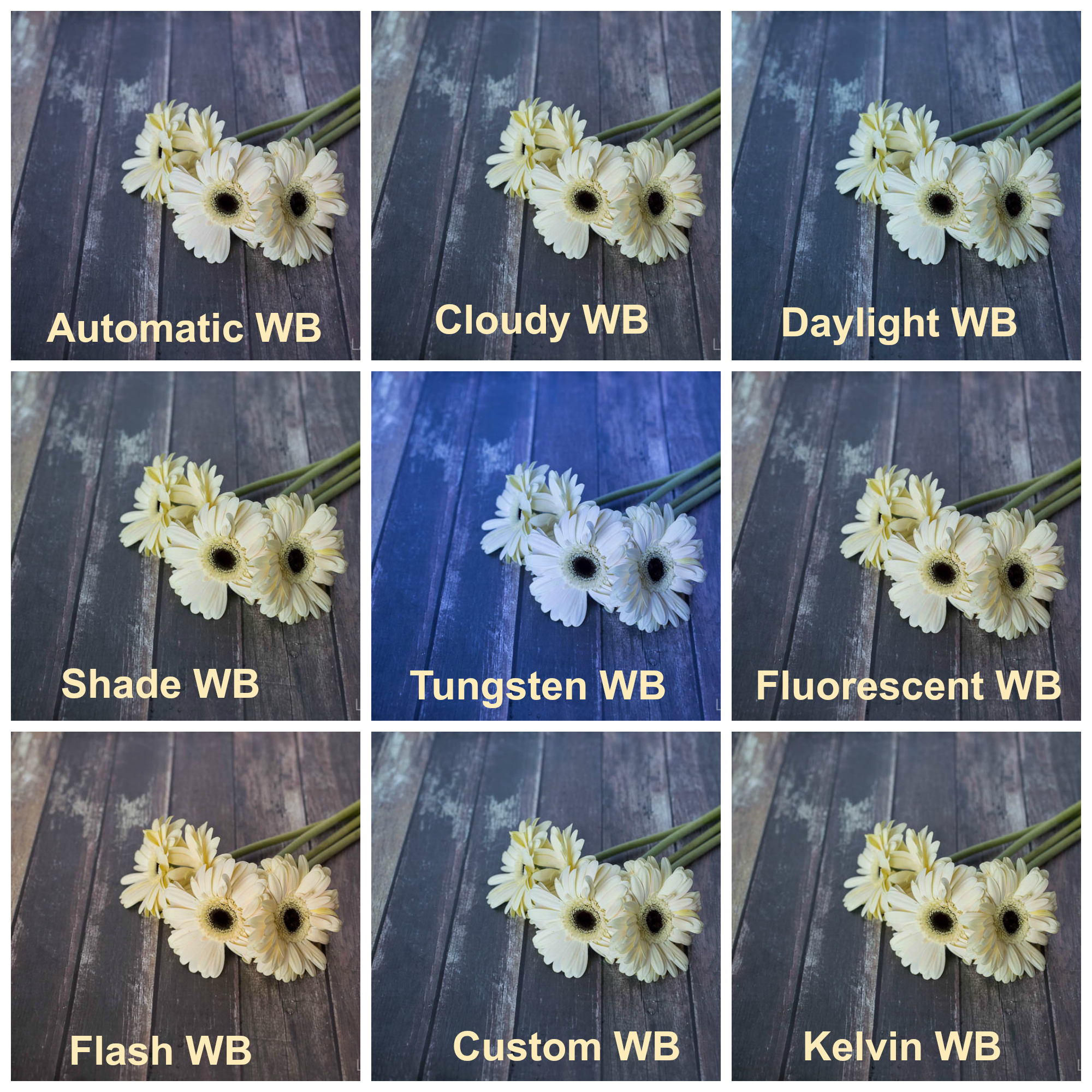
You are really learning all the tools of the camera aren't you ... well, not really - there's a long way to go but you are learning about some of the most important adjustments you can make on your camera so that you can truly take unique, one of a kind, photos!! That's honestly, pretty awesome!! This week we learned about white balance and why we need to be good about telling our camera what color the light we are shooting in is. For today's blog:

  • Please post your Photoshop Assignment and 3 favorite images you took this week.
  • Discuss White Balance. What did you notice about the different settings you used this week and how did each setting specifically affect the color of the image you took.
  • Do you notice a significant difference between the images you took with different WB settings? Having completed this assignment does it seem important to adjust these settings or not particularly?
  • Discuss whether you think the best photo taken for each subject was the one that aligned best. For example, if you took a picture of a flower on a bright sunny day, did it look best under the "Daylight" setting or did you think it actually ended up looking better using a different setting?
  • Discuss what you enjoyed about this assignment? Were there any challenges you faced? What could you have done, if anything, to make the process go smoother.
Thank you!

Photography Blog Post #5 - Shutter Speed


This week you had the opportunity to learn about and experience what various shutter speeds can do for your photography!  Shutter speed is another amazing tool you can use to create incredible images and gives you the specific power to freeze motion or show motion with your photography!!  For today's blog, please complete the following:

  • Post your completed Photoshop assignment along with your two favorite images from the week.
  • Respond to the following questions:
    • Explain to your readers what shutter speed is/does.  Be sure to explain it clearly and discuss how your images above demonstrate the different shutter speeds you used.
    • Explain how you would show motion and how you would freeze motion.  This is a good opportunity for you to discuss what slower shutter speeds can do for you and what faster shutter speeds can do for you.
    • Discuss a few situations where you would definitely want to use a slower shutter speed and show movement in your photography.  Discuss a few situations where you would definitely want to use a faster shutter speed to freeze movement in your photography.  At minimum, you should discuss 2 examples of each.  Be sure to also discuss how shutter speed can affect your audiences perception about what is going on in the image.
    • Lastly, discuss your experience this week with our assignment.  Did you enjoy the assignment?  Did you face any challenges?  What were they?  What did you enjoy about the assignment.
Thank you!!

Photography Blog Post #3 & #4 - Mastering Photoshop Filters and Layer Blend Modes


Week 3 has come and we are taking a brief break from our field assignments to focus on some of the creative elements you can add to your photography by using Photoshop. This week you will complete two assignments. The first one gives you an opportunity to take an image and use Photoshop to create a watercolor painting effect. The second assignments allows you to take another image along with a texture of your choice and learn how to blend your chosen textures with your photo in Photoshop.
For today's blog there are two parts, please complete them as separate postings:


Watercolor Painting Effect
  • Post your original image and adjusted image for the watercolor painting effect assignment
  • Please discuss the following in detail:
    • Discuss the different filters you used to complete this Watercolor Painting Effect.  Be specific and, as much as possible, discuss what each of the filters you used accomplished.
    • What did you think of your final product in comparison to your original image?
    • Discuss an image you would like to take and how adding a water color painting effect would either enhance the original image or detract from it.  Does this seem like a tool you would like to use again with your own work?
    • What is your impression of Photoshop and what have you liked about working with it to date?  You should include 3 things you think are "neat" about working with the program.
How to Blend Textures with Photos in Photoshop
  • Post your original image(s) and your adjusted image for the blending textures with your photo assignment.
  • Please discuss the following in detail:
    • Discuss the layer blend modes and what that does to your original images.
    • Discuss the different blend modes and how they affected the look of your image - be sure to address the Normal, Dissolve, Multiply, Screen, Overlay, Soft Light, and Hard Light blend modes and the effect they had on your image.
    • Which Blend mode did you ultimately choose to use?  What did you particularly like about this blend mode?
    • What does the desaturate command do for your image and did you like the outcome? What about inverting the texture, hue/saturation, Gaussian blur, etc?
    • What do you like about the final image and its effect?  What do you not like?  Does this seem like a neat tool to you? Why or why not?  Lastly, what did you think of this project? Easy, challenging? Would you be able to use this for any photographs you have or would take?

Monday, November 2, 2015

Week of November 2nd - 6th


Welcome to the week of November 2nd - 6th.  Please see the outline above for what we will be working on this week.  I recognize with our field trip last week (1/2 of you out) and, again, this week with the other 1/2 of the class, there was limited time to complete all work to the very best of your ability.  For that reason, I am offering you time in class today, Monday, to complete all of the requirements from last weeks assignment.  In addition, this week, partly because I will be off campus almost every day and partly because I want you to build your Photoshop repertoire I have posted two assignments, neither of which require you to leave the classroom.  These assignments will be due in Schoology on Friday and we will post them to our blog next Monday, November 9th. Please make the most of your time in here this week and make sure you are right on track with meeting all requirements for the course!

Thanks.  I am excited to return to Adobe with the 2nd half of you and also look forward to you learning some fun and creative Photoshop tools.  

Monday, October 26, 2015

Photography Blog Post #2 - "Aperture and Depth of Field"


For today's blog, please respond to the following questions:
  1. Discuss the different subjects you chose to photograph. Why did these subjects appeal to you and why did they seem appropriate for this specific assignment?
  2. Analyze a series of photographs that show various depths of field.  What technique do you like the most? Why? How do you think the aperture affects the feeling of an image?
  3. Discuss why you chose this set of photos over the other 3 sets you took (why do you like it, how does it fit the requirement)?
  4. Explain the camera setting/modes you used and why! You must include the f/stop and shutter speed numbers with an accurate explanation of how the aperture values affected each photo for full credit! Remember to discuss the concept of “everything in focus” vs. “one thing in focus” and how your camera settings affected this for each photo.
  5. What skills did you learn and use completing the Photoshop element of this project?  Be specific and thoroughly outline each of the tools you used to create your final product.
  6. What decisions did you make and/or challenges did you encounter while physically taking the photo. If your answer reads, “I did not make any decisions or encounter any challenges,” you will not receive credit. Be a conscious and intentional photographer, and remember, “You don’t take a good photograph, you make it.” –Ansel Adams
A reminder to post your completed photoshop assignment on your blog along with 3 of the 6 images shot, one that clearly shows “everything in focus” and one that clearly shows the same subject with “one thing in focus.” Then pick an image between the two that shows the transition. Refer to the image I posted as an example.

Wednesday, October 21, 2015

Blog for the Block Day and Friday!


Alright everyone - read carefully!!  I've made the decision that I am going to allow you to continue using the cameras today (block) day but I am not particularly pleased with the past two days.  Yesterday in 3rd period a few students were reported as going into a classroom taking pictures - as you can imagine I am not happy about that.  In 2nd period on Tuesday the following was very disappointing:

  • Students didn’t return in time to upload photos - you need to be back in class with a minimum of 10 minutes to upload your photos and put your cameras away neatly.
  • One student left their memory card in the computer - your SD card always needs to be placed back in your camera before returning it to the closet
  • One camera was left on desk - that is not a safe place for a $1,000 piece of equipment!!  
  • Lens caps were left off while not shooting images.
  • Some students students were not using the class time well to complete assignments.  Photos, Blog and Photoshop Assignment are due Friday by the end of class.
  • Lastly, my personal materials brought to class for you to photograph were left scattered around room for me to clean up.
I hope you can understand why this would be upsetting for me, especially when I am trusting you with valuable equipment AND to represent the program well when out of class.  I expect that each of you have read the above and will respect these expectations today - especially with Ms. Solomon here in my place while I am at SAP.  My only reason for allowing cameras out today is because I don't want to penalize those of you who respected and followed the instructions and who waited patiently Tuesday for your turn to take the cameras out.

Please work well today, use the instructions and tutorial videos posted in Schoology and don't forget to respond to the blog (thoroughly) with the required images!

Thanks!

Tuesday, October 20, 2015

Photography Blog Post #1 - "Pop Art"


For today's blog, please respond to the following questions:
  • What is Pop Art?
  • Pick one artist, research them and discuss their work.  Why is this artist’s work considered Pop Art?  Why did you pick this artist and why do you like his/her work? (this discussion should be ~5 sentences)
  • What would you say are some of the most iconic images in the 21st century?  Think about marketing, mass media, consumer products, etc that everyone your age is familiar with.  Were you able to capture one of these images in one or more of your twenty photos? (this discussion should also be ~5 sentences)
  • How did you choose the photo that you used in your Photoshop project?  What about it made it your best photo for this project?
  • What skills did you learn and use completing the Photoshop element of this project?  Be specific and thoroughly outline each of the tools you used and what adjustments it allowed for - in other words, what filters did you use for each of the nine grids in your Photoshop assignment
  • What did you learn and enjoy about this project?  Discuss both the Photoshop tools you worked with and the experience you had with the camera itself as you took photos.  Were there things you realized about the photo taking process as you completed the project?
For this course you will be posting one blog each week.  The expectation is that the blog will be thorough and well thought out.  Remember at the top of your blog you should have 4 images. Your 3 best original images and then your "Pop Art" Photoshop Assignment.  Please spend some time formatting the blog as aesthetics will factor into your grade.